
Why staff permissions matter in day-to-day trading
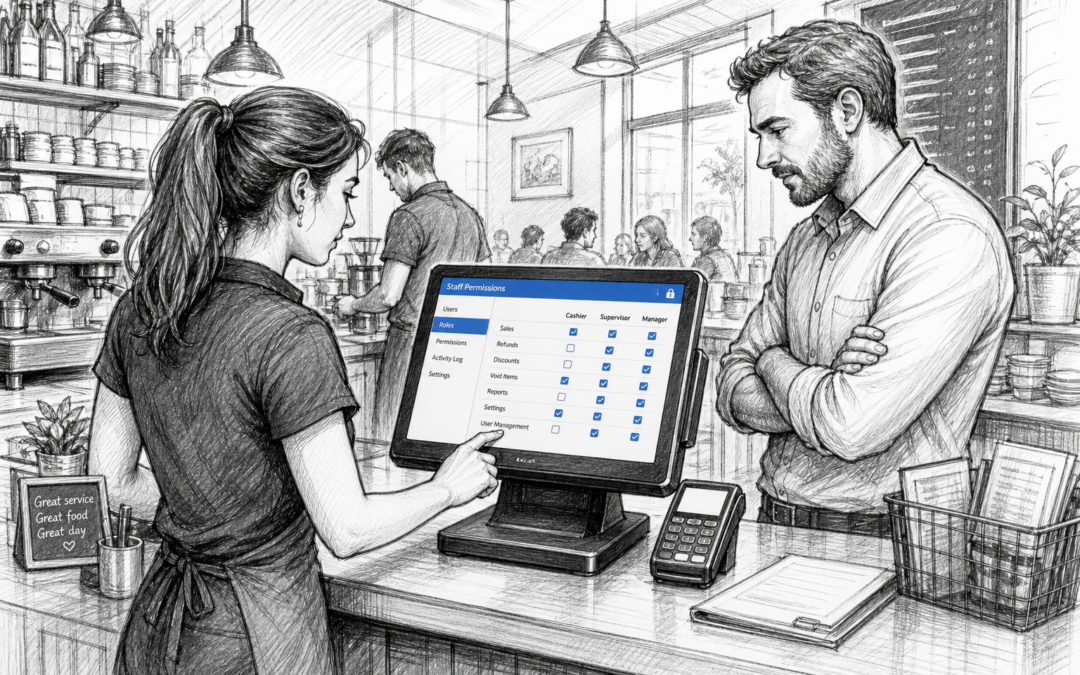
When a business is busy, it is easy for tills to become a free-for-all. Staff may need to process sales quickly, but not every team member should have the same access to discounts, refunds, voids, reports or sensitive settings. That is where staff permissions come in.
In a UK retail shop, café, restaurant, bar or takeaway, staff permissions help owners keep control without slowing service down. The right EPOS setup makes it possible to match access levels to roles, so supervisors, managers and front-line staff can each do their job properly.
For many businesses, this is one of the biggest differences between a basic till and a proper EPOS system. It is not just about making sales. It is about deciding who can do what, when, and why.
What staff permissions actually do
Staff permissions let you set different access rights for different team members. In practical terms, that might mean:
- cashiers can take payments and apply standard items
- supervisors can process refunds or void transactions
- managers can change prices, review reports or override alerts
- only authorised users can access settings, end-of-day figures or sensitive functions
This structure helps reduce errors and creates a clearer audit trail. If something unusual happens on a till, it is easier to see who did what and when.
Helpful in both retail and hospitality
In retail, permissions can help manage discounts, age-restricted products, returns and cash handling. In hospitality, they can be especially useful during a busy lunch rush or evening service, when more than one person may be using the same terminal.
For example, a café may want staff to add items to a table quickly, but only a supervisor to authorise a large discount on a bill. A restaurant may want waiters to send orders to the kitchen, while a manager handles refunds or split bill adjustments. A bar may need tighter control over voids and complimentary drinks.
How permissions improve control without slowing service
A well-designed EPOS system should support fast service, not get in the way of it. Good permissions settings balance control and convenience. If they are too restrictive, staff waste time waiting for managers. If they are too loose, mistakes and unnecessary overrides become more likely.
The aim is to give each role just enough access to do the job well. That makes daily operations smoother and helps managers spend less time correcting avoidable issues later.
Reducing accidental errors
Not every mistake is deliberate. In a busy environment, staff can press the wrong button, apply the wrong discount or reopen the wrong order. Permission settings can reduce the chance of these mistakes turning into bigger problems.
They can also help with training. New starters can begin with limited access while they learn the system. As confidence grows, permissions can be expanded gradually. That is often a safer and more practical approach than giving everyone full access from day one.
Supporting accountability
When permissions are linked to individual logins, managers get a clearer picture of who completed each action. That level of visibility can be useful for spotting patterns, such as repeated voids, unusual discount use or frequent till overrides.
This is not about creating a heavy-handed environment. It is about helping honest staff work well and giving business owners more confidence in their daily controls.
Why local EPOS support still matters
For UK retail and hospitality businesses, choosing an EPOS system is only part of the job. Getting the permissions set up correctly often depends on working with a supplier that understands how local businesses operate.
Local EPOS support can make a real difference when you need to:
- set different access levels for multiple roles
- adjust permissions as staff change or grow in confidence
- resolve issues quickly during busy trading periods
- understand which settings are appropriate for your type of business
That kind of support is particularly useful for independent businesses that do not have an in-house IT team. A practical UK-based provider can help you set things up sensibly from the start, rather than leaving you to work it out alone.
Samtouch is designed with those everyday realities in mind. For businesses looking at EPOS software for retail or hospitality, it offers a straightforward way to manage tills, staff access and reporting without overcomplicating the workflow. More information is available at www.samtouch.co.uk.
What to look for in staff permission settings
If you are reviewing your current till system or considering an upgrade, it helps to ask a few practical questions:
- Can permissions be tailored by role?
- Are refunds, voids and discounts controlled separately?
- Can users have individual logins?
- Is there a clear record of overrides and changes?
- Can settings be updated easily as the team changes?
If the answer to these questions is no, your current setup may be creating more risk and admin than necessary.
A simple feature that can make a big difference
Staff permissions may not be the most visible EPOS feature, but they are one of the most useful. They help protect margins, improve accountability and make everyday operations easier to manage. For UK businesses that rely on quick, accurate service, that matters.
Whether you run a convenience store, café, restaurant, bar or takeaway, the right access controls can support your team without slowing them down. That is why it is worth thinking beyond the basics when choosing EPOS software.
Contact YCR Distribution at sales@samtouch.co.uk or call 01924 438238 to discuss Samtouch EPOS for your business.
Recent Comments