
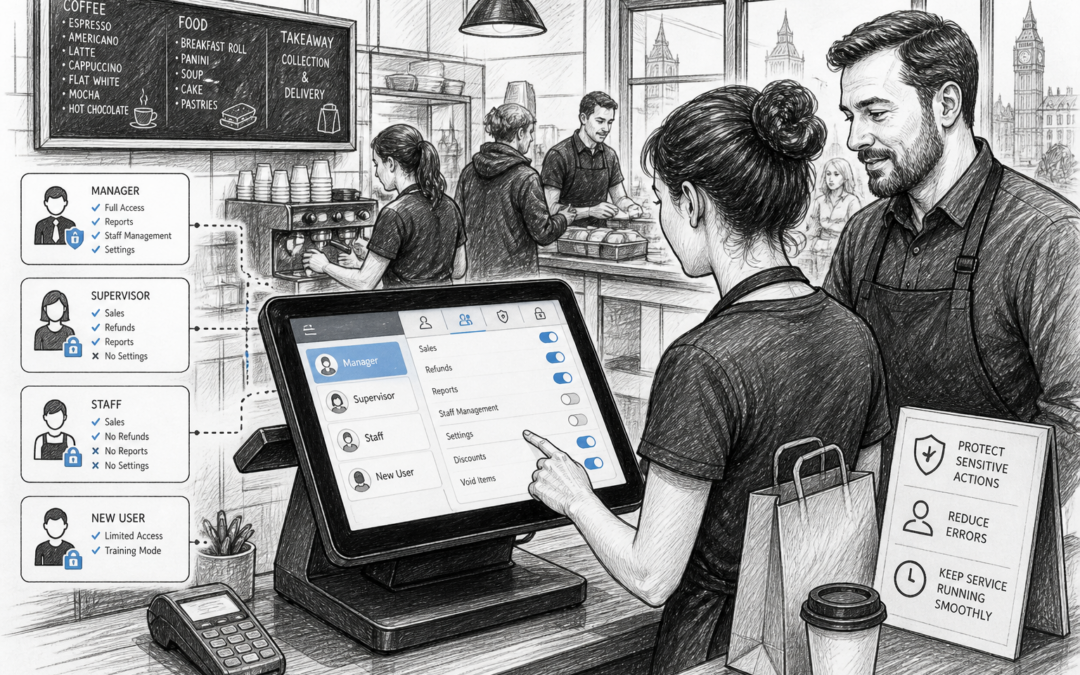
For many UK businesses, EPOS software is not just about taking payments. It also helps control who can do what, when and how on the till. That is where staff permissions become important.
Whether you run a shop, café, restaurant, bar or takeaway, giving every employee the same level of access can create avoidable problems. A good EPOS setup lets you decide which staff members can process refunds, edit orders, apply discounts, view reports or carry out other sensitive tasks.
It may sound like a small detail, but the right permissions can make daily trading smoother, reduce mistakes and give business owners better oversight.
What are staff permissions in EPOS?
Staff permissions are the controls that set different access levels for different employees. In practical terms, they help you match system access to each person’s role.
For example, a new team member might only need basic till functions, while a supervisor may need to handle refunds, voids or end-of-day tasks. A manager might also need access to reports, till settings or price changes.
Instead of relying on memory, verbal instructions or hand-written notes, the system itself can guide what each user is able to do.
Why this matters for UK businesses
In busy retail and hospitality settings, mistakes can happen quickly. A customer may be overcharged, a discount may be applied incorrectly or a refund may be processed without proper checks. Staff permissions help reduce those risks by limiting access to the functions that matter most.
They are especially useful in businesses with a mix of permanent staff, part-timers, seasonal workers and weekend cover. When not everyone needs full access, it makes sense to keep controls tight.
Protecting sensitive actions
Some EPOS functions require more control than others. These often include:
- refunds and voids
- discount approvals
- price changes
- cash drawer actions
- report viewing
- voiding items after a transaction
By restricting these actions to trusted team members, you reduce the chance of accidental errors and make it easier to investigate issues if they do arise.
Improving accountability
When staff log in with their own permissions, it becomes easier to see who did what. That can help with training, performance management and day-to-day oversight. It also supports more consistent processes, because employees are encouraged to follow the right steps rather than using shortcuts.
How staff permissions help different sectors
Staff permissions are useful across both retail and hospitality, but the benefits vary depending on the business.
Retail shops
In convenience stores, fashion shops, gift shops or hardware stores, permissions can help manage discounts, refunds and end-of-day checks. If you have a busy counter with several staff members, limiting access to certain actions can prevent losses and reduce errors.
Cafés, restaurants and takeaways
In hospitality, permissions can help keep orders accurate and service flowing. For example, a front-line server may need to enter orders quickly, while a supervisor handles amendments, cancellations or discounts. In a takeaway or quick-service site, this can be particularly useful during peak periods when the team is moving fast.
Bars and pubs
Bars often need tighter control over voids, over-rings and cash handling. Staff permissions can help managers keep a closer eye on transactions without slowing down service at the bar.
Why local EPOS support still matters
When you are setting up permissions, the details matter. Which roles should have access to reports? Who should be able to process a refund? Can staff members be assigned different levels depending on branch or location? These are the kinds of questions that are often easier to answer with help from a UK-based EPOS provider who understands how local businesses work.
Local support can be especially helpful during setup and staff training. If your team needs a practical explanation of how permissions should work in your business, it is useful to speak to someone who understands retail and hospitality operations in the UK, rather than having to figure it out alone.
Samtouch, available at www.samtouch.co.uk, is designed for UK retail and hospitality businesses that want a practical EPOS system with user control built in. For many owners, that kind of support is just as important as the features themselves.
Tips for setting permissions well
Start with the role, not the person
Think about what each job needs to do. A till operator does not need the same access as a manager. Setting permissions by role makes the system easier to manage, especially when staff change or seasonal workers join.
Keep the setup simple
Overcomplicated permissions can create confusion. The aim is to make the system clearer, not harder to use. Keep the levels logical and easy for your team to understand.
Review access regularly
As your business grows, staff responsibilities can change. A person who started on the shop floor may later take on supervisory duties. Regular reviews help make sure access levels stay appropriate.
Train staff on why the controls exist
People are more likely to follow the system if they understand the reason behind it. Explain that permissions are there to protect the business, improve accuracy and keep service running well.
A practical feature with everyday value
Staff permissions are not the flashiest EPOS feature, but they are one of the most useful. They help UK businesses keep control, reduce unnecessary mistakes and make sure the right people can handle the right tasks.
For independent retailers, cafés, restaurants, bars and takeaways, that can make a real difference to day-to-day operations. And when permissions are set up properly, the system becomes easier for the whole team to use.
If you are looking for a UK EPOS solution that supports practical access control as part of a wider business setup, Samtouch is worth exploring.
Contact YCR Distribution at sales@samtouch.co.uk 01924 438238 or visit www.samtouch.co.uk to find out more.
Recent Comments