
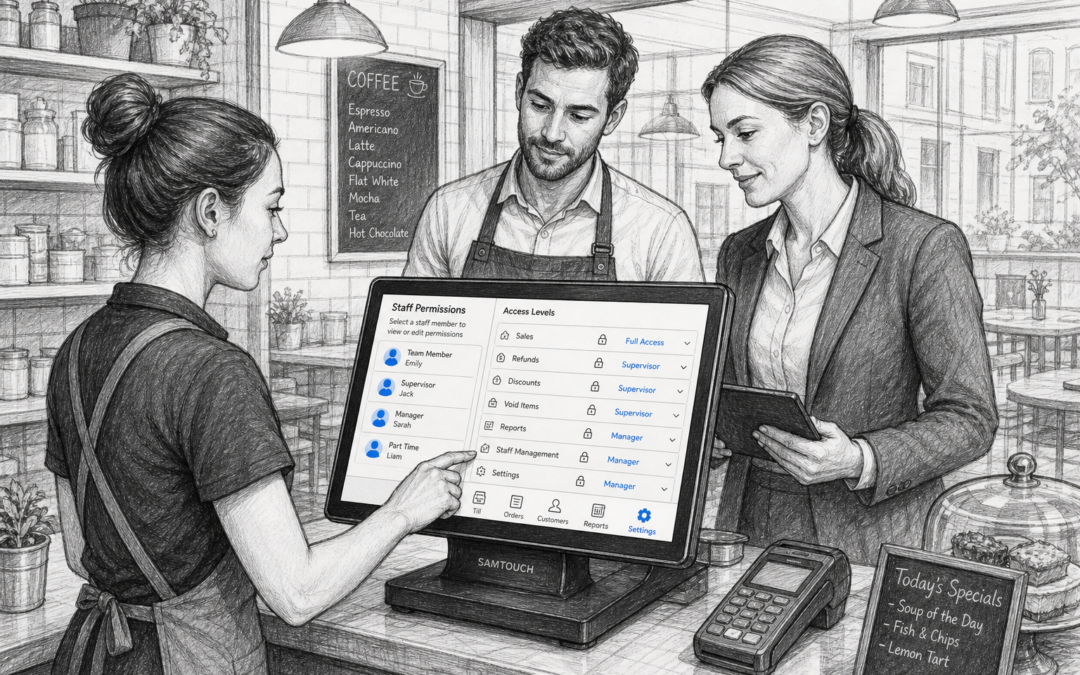
For many UK retail and hospitality businesses, the till is used by a wide mix of staff. From managers and supervisors to part-time colleagues and seasonal team members, not everyone needs the same level of access. That is where staff permissions become a practical part of a good EPOS setup.
Staff permissions let you define what each user can see and do on the system. This can help reduce mistakes, protect sensitive information and give managers better control over daily trading. Whether you run a shop, café, restaurant, bar or takeaway, the right access controls can make service more organised and easier to manage.
What are staff permissions in EPOS?
Staff permissions are settings that control which actions individual team members can carry out on your EPOS system. In simple terms, they help you decide who can process refunds, apply discounts, void items, view reports, change prices or access cash-related features.
Rather than giving everyone the same login, permissions let you separate responsibilities by role. A supervisor may need more access than a new starter, while a manager may need full control across the system.
Why staff permissions are useful for UK businesses
1. They help reduce mistakes at the till
When staff only see the functions they need, there is less chance of accidental changes. This is especially useful in busy environments where speed matters, such as cafés at lunchtime, restaurants during service or convenience stores with constant footfall.
If a team member does not need to adjust prices or process refunds, limiting those features can help avoid errors and keep transactions consistent.
2. They support better accountability
With individual logins and permission levels, it is easier to understand who did what and when. That can be helpful if you need to review a transaction, check a discount or follow up on a till discrepancy.
For businesses with shift working, permissions also help managers keep a clearer picture of operational control. It is a simple way to make responsibility more visible without adding extra paperwork.
3. They protect sensitive business information
Not every team member needs access to sales reports, takings summaries or margin-related information. Restricting this data to managers and owners helps protect your business information while keeping the frontline experience straightforward.
This can be particularly useful for independent retailers and hospitality venues where a small team may share one system across multiple roles.
Where permissions make the biggest difference
In retail shops
Retail operators often need permissions for returns, discounts, cash drawer access and price overrides. A staff member on the shop floor may only need the ability to serve customers and process standard sales, while a supervisor handles exceptions.
This is helpful in fashion shops, gift shops, hardware stores and multi-department retail businesses where some products or transactions need a closer check.
In cafés, restaurants and takeaways
In hospitality, permissions can be useful for removing items, applying discounts, reopening bills or accessing end-of-day figures. That helps reduce the risk of accidental changes during busy service periods.
For example, a waiter may only need to take orders and print tickets, while a manager can authorise voids or review reports at the end of service.
For businesses with seasonal or part-time staff
Many UK businesses rely on temporary staff during holidays, weekends or peak trading seasons. Staff permissions are especially useful in these situations because they allow you to give new team members the access they need without opening up every part of the system.
This makes training simpler and helps you scale staffing up or down without losing control of the till.
How permissions improve day-to-day service
Good EPOS permissions are not just about control. They can also improve service speed. When the till layout is matched to the role of the user, the system feels easier to use and staff can focus on customers instead of searching through menus they do not need.
That matters in live service environments, where every second counts. A clear setup can reduce hesitation at the till, help newer staff settle in faster and support a more consistent customer experience.
Why local EPOS support still matters
For UK retailers and hospitality businesses, local support can be a real advantage when setting up staff permissions. Every business works differently, and the right access levels often depend on how your team is structured, how many locations you run and which tasks you want to keep restricted.
A local UK EPOS provider can help you think through those details with practical advice based on real trading conditions, not just generic software settings. That can save time during setup and make it easier to adapt the system as your business grows. It is one reason businesses often look for a solution like Samtouch at www.samtouch.co.uk, where the focus is on fitting the EPOS to the way you actually work.
Choosing the right permission setup
If you are reviewing your EPOS system, start by listing the actions that should be limited. Common examples include refunds, voids, discounts, price changes, cash declarations and report access. Then decide which roles need each function.
A good setup should feel practical rather than restrictive. The aim is to give staff what they need to do their jobs well, while keeping important controls in the right hands.
For many businesses, this is one of the simplest ways to improve control without changing the way the counter operates. It works quietly in the background, which is often exactly what busy owners want.
Final thoughts
Staff permissions are a small EPOS feature that can make a big difference. They help reduce errors, improve accountability and protect sensitive business functions while still allowing teams to work efficiently. For UK retail and hospitality businesses, that balance is often essential.
If you are looking for a practical EPOS system with sensible permission controls and UK-based support, Samtouch may be worth exploring.
Contact YCR Distribution at sales@samtouch.co.uk 01924 438238 or visit www.samtouch.co.uk to find out more.
Recent Comments